
Earn rewards for bringing students to UniZy
UniZy Squad is UniZy's referral programme. Members share their Squad Code and earn when students sign up with it and start posting listings.
Show my code
How it works
-
You share your Squad Code
Share your code with students and ask them to sign up with it. Your My code page has a QR code and your code ready to show them.
-
They sign up
A sign-up counts once they finish registering, verify their university email and your code is accepted.
-
They post listings
You also earn for listings they publish within a set time after joining, up to a limit.
-
You cash out
Withdraw your balance to your bank or as a voucher. Payments are normally completed within 48 hours.
Your joining email explains the payment structure in full, including what you earn for each sign-up and listing. On days with new activity, you’ll also get an earnings update by email at around 10 pm.
What you get
Rewards for real results
You earn for every qualifying sign-up and listing, paid by bank transfer or voucher.
Priority interviews
When UniZy hires for a role open to external applicants, current and former members who meet the requirements are interviewed before general applicants.
Your own schedule
There are no set hours and no targets. Promote UniZy when it suits you, and stop whenever you like.
Who can join
Anyone aged 18 or over with a UniZy account can join, as can societies and other organisations. Every member is approved by the UniZy team.
Before you start promoting, read the Squad rules.
Questions about payments or earnings? Email support@unizy.app.
My code
Show this to students. They scan the QR code to download UniZy, then enter your Squad Code when they sign up.
Type the three characters before ❤️UniZy. It’s only saved on this device.
Scan to download UniZy
Then enter this Squad Code
❤️UniZy
They only type . The ❤️UniZy part is already filled in.
Type your code above and it will appear here.
If the QR code won’t scan, turn your screen brightness up.
Guide
Quick answers to the questions students ask when you tell them about UniZy.
About UniZy
What is UniZy?
UniZy is a marketplace app just for university students, built by LSE alumni. Students buy and sell items and services with each other, and every user is verified with a university email.
What can you find on it?
-
Value FindsNew and second-hand items, such as electronics, books, furniture and clothing.
-
Study MateTutoring and academic help across subjects, courses and modules.
-
Homemade MealsHomemade food, with ingredient, diet and allergen information.
-
Home SearchRooms, sublets and tenancy replacements.
-
Tidy UpSmall household help, such as cleaning, laundry and organising.
How is it different from competitors?
- It’s only for students. Everyone verifies a university email, so users are buying from and selling to other students.
- It’s everything students need in one place. Alongside second-hand items, students can find tutoring, homemade food, household help and rooms, all in one app.
- It’s built around universities. Every listing shows the seller’s university, and students can filter listings by university as well as distance. Buying from someone at the same university makes it easy to agree a common spot to meet, like the campus or library.
Signing up
Most questions come up on the first sign-up screen.
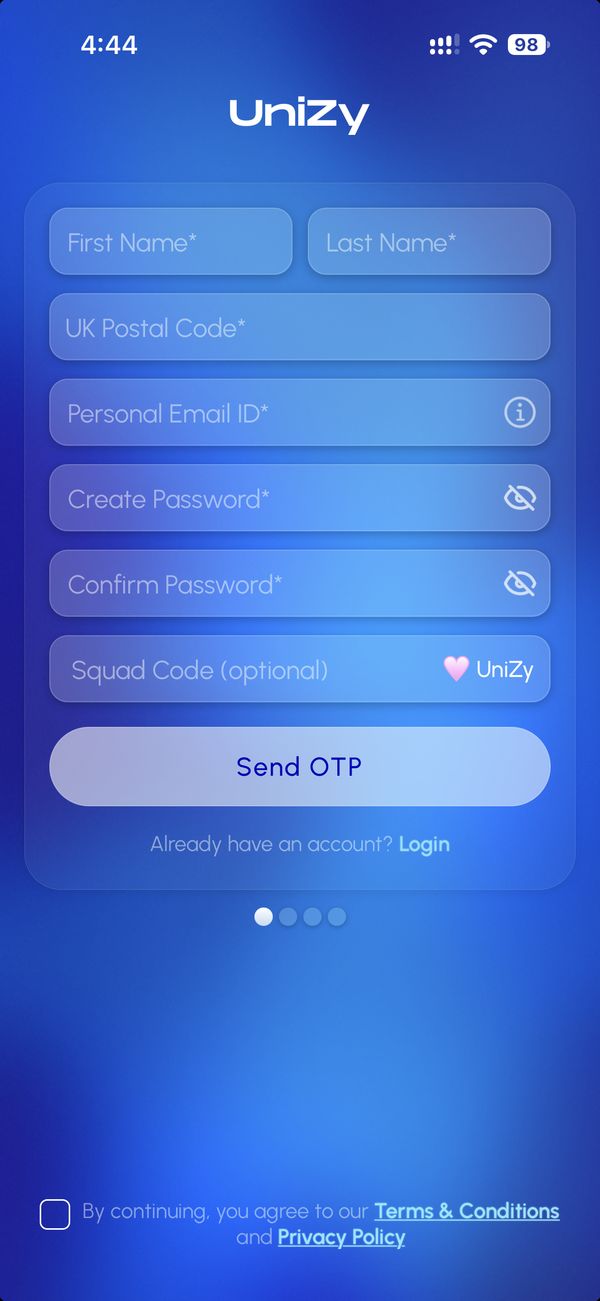
- UK postcodeUniZy uses it to work out how far away each listing is, so students can see and filter listings near them. It also fills in their city automatically. Their postcode is never shown to other users.
- Personal emailThis is the main account email, and Send OTP sends a code to it. Students then verify their university email in a later step, which proves they’re a student. Both are needed because university emails are usually deactivated after graduation, and the personal email keeps the account working.
- Squad CodeStudents enter your code here. The ❤️UniZy part is already filled in, so they only type the three characters before it. Once it’s accepted, your name appears under the box. Codes can’t be added after sign-up, and they aren’t discount codes.
- Terms and ConditionsThis box must be ticked before they can continue.
Finding your way around
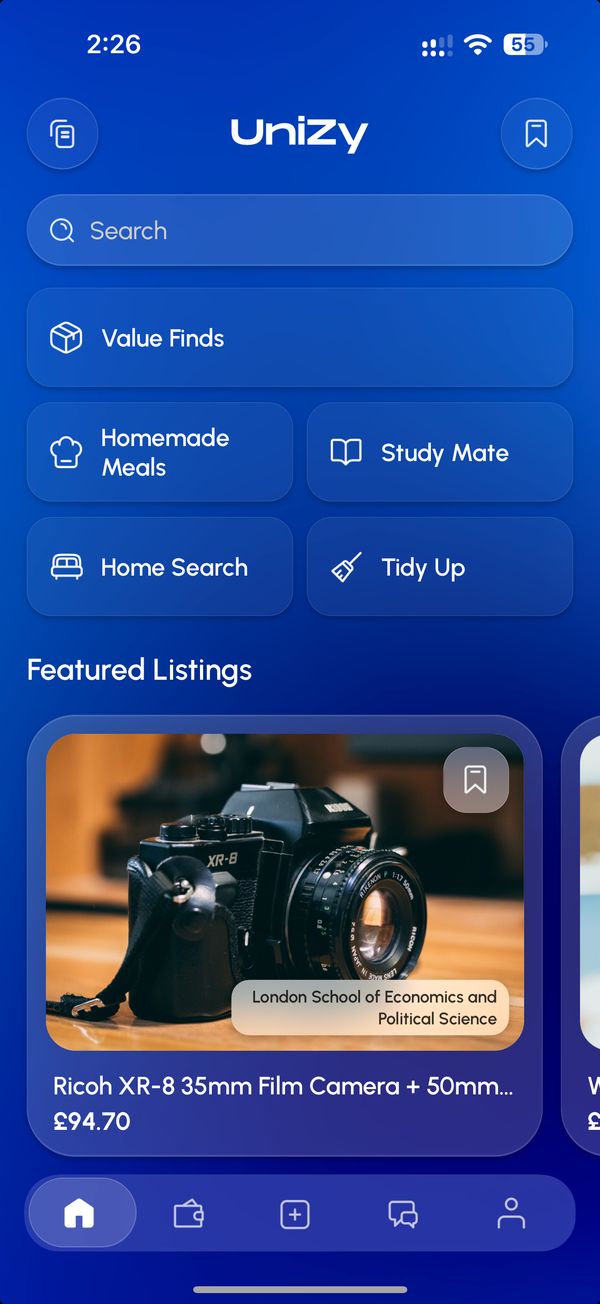
- My ListingsListings you’ve posted. Sellers enter the buyer’s transaction verification code here to complete a sale.
- BookmarksListings you’ve saved for later.
- CategoriesBrowse each of the five categories.
- Featured ListingsPromoted listings. More on these below.
- TransactionsYour purchases and sales. Buyers find their transaction verification code here.
- New ListingPost something to sell or offer.
- ChatMessage buyers and sellers.
Buying and selling
How does paying work, and why is it safer?
- The buyer pays in the app, and UniZy holds the money.
- A six-digit transaction verification code appears in the buyer’s Transactions tab.
- Once the buyer has the item or service, they give the code to the seller.
- The seller enters it in My Listings, and the payment is released.
This protects both sides. The seller knows the money is there before handing anything over, and the buyer’s money only reaches the seller once they have what they paid for. Until the code is shared, the buyer can cancel and nothing is paid. Once the code is used, the sale is final, so buyers should only share it when they’re happy.
Home Search works differently. The seller pays a fee to list, there’s no payment in the app, and both sides arrange everything through chat.
If something goes wrong, users can report a listing or user in the app, or email support@unizy.app.
What is a Featured Listing?
A listing the seller has paid to promote. It appears at the top of its category and in Featured Listings on the home screen, with a Featured label. It gets more visibility but doesn’t guarantee a sale. For most categories, the fee is only taken from the seller’s payout if it sells. For Home Search, it’s paid when the listing goes up.
What is Stripe onboarding?
Stripe is the payment company UniZy uses to process payments and pay sellers. Sellers can post listings straight away, but they need to complete Stripe onboarding before they can complete a sale. Stripe asks for details such as a bank account and address. Buyers don’t need to do it.
Getting help
-
Payments, earnings or referrals
Email support@unizy.app with your name, Squad Code, the relevant dates and what happened. Never send passwords or verification codes.
-
Something isn’t working in the app
Post it in the Bug Reports group in the Squad WhatsApp community, with a screenshot if you can.
-
Ideas and feedback
Share them in the Feedback and Suggestions group in the WhatsApp community, including anything you’re hearing from students.
-
Earnings updates
On days with new activity, your update arrives by email at around 10 pm UK time. If you don’t see it, check your spam folder.
Squad rules
The most important rules for Squad members. The full Terms and Conditions cover everything else.
Do
- Share UniZy with genuine students.
- Explain UniZy’s features and services accurately.
- Encourage genuine registrations and listings.
- Be transparent about earning referral rewards.
- Obtain permission before promoting in universities or other premises.
Don’t
- Create fake, duplicate or misleading registrations or listings.
- Mislead students or promise unauthorised benefits.
- Send unsolicited promotional emails, texts or messages.
- Claim to be an official UniZy employee or representative.
- Engage in fraudulent activity or misuse your Squad Code.
Breaking these rules may lead to removal from the Squad.
Read the full Terms and Conditions